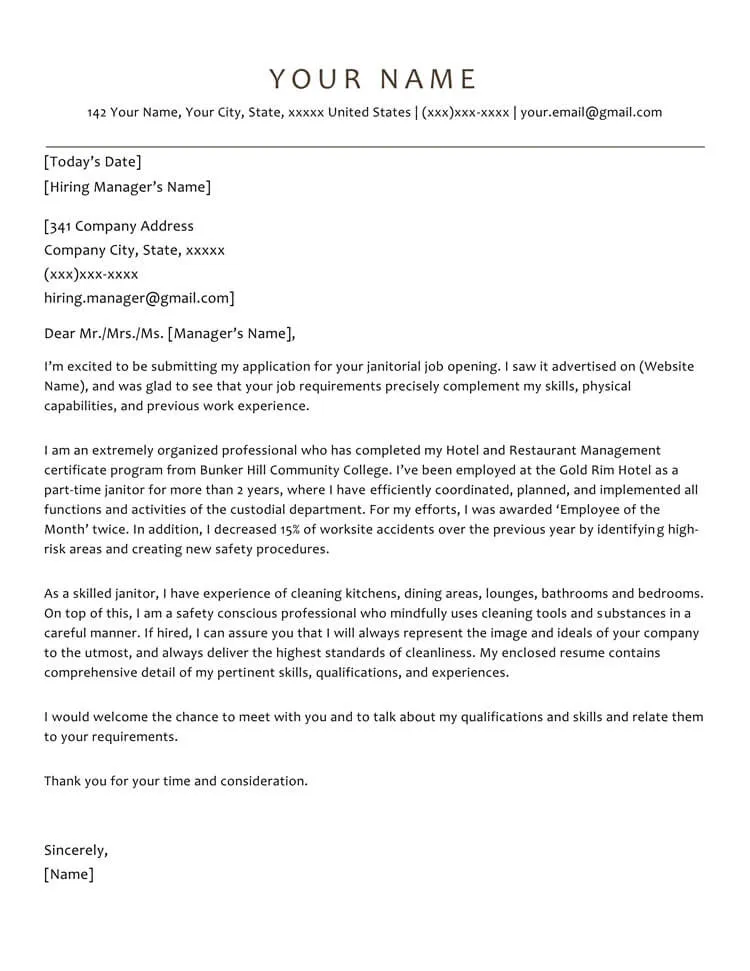
Why Omit the Address in a Cover Letter?
In the ever-evolving landscape of job applications, certain conventions are shifting. One such change involves the address on a cover letter. While traditionally included, the physical address is becoming increasingly optional, and in some cases, it is even advisable to omit it. Several factors contribute to this trend. The primary reason is the digital nature of modern job applications. Many applications are submitted online, rendering the physical address less relevant. Furthermore, omitting the address can save space, especially on a one-page cover letter, allowing you to highlight more important information. Finally, it can protect your privacy, as providing your address on a widely distributed document could potentially expose you to unwanted mail or solicitations. Understanding these reasons is crucial for adapting your cover letter writing to contemporary standards. Consider your address as optional in most scenarios, prioritizing the inclusion of information that directly benefits your candidacy.
When is it Okay to Skip the Address?
Knowing when to omit the address is just as important as knowing why. Generally, it’s acceptable, and often preferred, to skip the address in almost all online applications. This includes applications submitted through company websites, job boards like LinkedIn or Indeed, and email submissions. If you’re submitting a cover letter via email, your contact information will often be in your email signature, making a redundant address unnecessary. In situations where the application process is strictly online, the address is practically obsolete. The physical address may still be required if you are sending a physical cover letter, but these are far less common these days. However, if a specific application instruction dictates the inclusion of your address, always follow those instructions. Always assess the requirements of each specific job application before making a decision about whether to include or omit your address. When in doubt, it is safe to omit your address, especially if it helps you present a more concise and impactful cover letter.
Modern Cover Letter Formatting

Modern cover letter formatting prioritizes clarity, readability, and a professional appearance. When omitting the address, the header section undergoes a slight adjustment. The goal is to ensure that the header looks clean, organized, and provides all the essential contact details without appearing cluttered. The overall layout should be easy on the eyes, with ample white space to separate the different sections. Choose a professional font such as Arial, Times New Roman, or Calibri, and keep the font size consistent, usually between 10 and 12 points. The formatting choices should reflect a professional demeanor while avoiding being distracting. The focus of the modern cover letter shifts towards content and easy readability. Consistent alignment, typically left-aligned, adds to the overall neatness and professional look of the letter. The overall goal is to make it easy for the hiring manager to quickly find your contact information and assess your suitability for the role. This also applies to resumes.
Header Alternatives
Without the address, your cover letter header needs a revised structure. The key is to provide all the essential contact details in an organized way. Start with your name, clearly displayed at the top. Underneath your name, include your phone number and your professional email address. These are the most crucial contact details. If you have a LinkedIn profile, consider including a link to it; this adds credibility and offers the hiring manager a quick way to learn more about your professional background. You can position this information at the top, aligning it to the left, or center it for a cleaner look. Ensure that the font is consistent with the rest of the letter. Remember to use a professional-looking email address, ideally one that includes your name. The header should be concise, easy to read, and provide all the necessary ways for the hiring manager to reach you. The primary goal is to make your contact information easily accessible.
Contact Information Placement
The placement of your contact information is critical for a cover letter. Your name and contact details should always be at the top of the letter, typically left-aligned or centered. This is where the hiring manager will immediately look to find out how to contact you. Make sure there is enough space between the header and the salutation to enhance readability. Avoid any distractions or excessive formatting in the header. Keep it clean, professional, and straightforward. The goal is to ensure the hiring manager can quickly locate your essential contact information without any difficulty. This simple practice shows respect for the reader’s time and enhances your overall professional image. Proper placement is a critical component of good cover letter format.
Email Address and Phone Number

Your email address and phone number are two of the most critical pieces of contact information in your cover letter. Ensure your email address is professional-looking; avoid using nicknames or unprofessional language. A simple format like firstname.lastname@email.com is ideal. Double-check that the email address is active and that you regularly check it for any responses from potential employers. Provide a phone number where you can be easily reached during business hours. Ensure your voicemail is set up professionally. You should also be prepared to answer your phone in a courteous and articulate manner. Accuracy is paramount; a typo in your email address or phone number could mean missing out on job opportunities. Therefore, always proofread these details carefully before submitting your cover letter. These two contact points are the main channels of communication, and it’s vital to make a positive impression.
Professional Email Etiquette
Email etiquette extends beyond just having a professional email address. When writing a cover letter, your email address serves as your first point of contact. If submitting your cover letter via email, the subject line should be clear and concise, usually indicating the job title and your name (e.g., “Application for Marketing Manager – John Doe”). The body of the email should briefly restate your interest in the position and mention that your cover letter and resume are attached. Always include a professional salutation such as “Dear Mr./Ms./Mx. [Last Name]”. If you’re unsure of the hiring manager’s name, use a generic greeting like “Dear Hiring Manager.” The email body should be brief; the main content should be in the attached cover letter. End the email with a professional closing, such as “Sincerely” or “Best regards,” followed by your full name. Avoid slang, emojis, or casual language. Review everything carefully before sending; a polished email reflects your professionalism.
Body of the Cover Letter
The body of the cover letter is where you showcase your qualifications, skills, and experience. It is your chance to persuade the hiring manager that you are a suitable candidate. The body should be well-structured, usually with three to four paragraphs. In the first paragraph, state the position you’re applying for and where you saw the job advertisement. Briefly express your interest in the company and the role. The subsequent paragraphs should highlight your relevant skills, experiences, and achievements. Use specific examples to demonstrate how you have met or exceeded expectations in previous roles. Quantify your achievements whenever possible; for example, use numbers to show how you increased sales or reduced costs. Tailor each cover letter to the specific requirements of the job. The body of the cover letter is the most important place to persuade the hiring manager that you are the best candidate. It’s also important to demonstrate your understanding of the role.
Addressing the Hiring Manager

Addressing the hiring manager by name is an important step in making a good first impression. Whenever possible, research the name of the hiring manager or the person responsible for reviewing applications. Using a specific name shows that you’ve taken the time to research the company and are genuinely interested in the position. If you can’t find the hiring manager’s name, using a general greeting like “Dear Hiring Manager” is perfectly acceptable. Avoid using overly casual greetings. Always err on the side of formality. The salutation should be followed by a colon. Make sure to spell the name correctly. Correct spelling and formatting are important. Personalizing the salutation can make your cover letter more impactful and demonstrate your attention to detail. It signals to the hiring manager that you are prepared and thorough.
Opening Paragraph
The opening paragraph is your first opportunity to capture the reader’s attention. Start by clearly stating the position you are applying for. Mention where you saw the job advertisement (e.g., on LinkedIn, company website, etc.). Then, briefly express your enthusiasm for the role and the company. The aim is to immediately grab the reader’s interest and establish a clear connection between your application and the job requirements. You can also include a brief statement that conveys your understanding of the company’s mission or values. Keep this section concise and impactful, setting a positive tone for the rest of your cover letter. Make your application clear and professional, showing your intent to be a valuable addition to the team. The opening is the most impactful paragraph of your cover letter, as it sets the tone for everything else.
Highlighting Skills and Experience
The core of your cover letter focuses on your skills and experience. Tailor this section to match the job description’s requirements. Start by identifying the key skills and experiences the employer is seeking. Then, use specific examples from your previous roles to demonstrate how you have successfully utilized those skills. Use action verbs to describe your accomplishments (e.g., “Managed,” “Developed,” “Led,” “Implemented”). Make sure your accomplishments align with the job description. This shows the hiring manager that you possess the necessary qualifications. Avoid simply listing your responsibilities; instead, focus on the results you achieved. For example, instead of writing “Managed social media accounts,” write “Managed social media accounts, increasing follower engagement by 30%.” This makes your experience more tangible and convincing.
Quantifying Achievements

Quantifying your achievements makes your cover letter more impactful and demonstrates the value you can bring to a company. Wherever possible, use numbers, percentages, and specific data to showcase your accomplishments. For example, instead of writing “Increased sales,” write “Increased sales by 15% in one quarter.” Quantifiable results make your achievements more credible and easier for the hiring manager to understand. Consider including metrics like the amount of money you saved, the number of projects you completed, or the percentage increase in efficiency. Use these details to show the scope of your contributions and their positive impact. Specific numbers are a powerful way to differentiate yourself from other applicants and show that you have a proven track record of success. This is especially effective when highlighting relevant skills.
Closing Paragraph
The closing paragraph should summarize your interest in the role, reiterate your suitability, and express gratitude for the opportunity. Reiterate your enthusiasm for the position and the company. Briefly restate how your skills and experience align with the job requirements. Thank the hiring manager for their time and consideration. You can also include a call to action, such as stating your eagerness to discuss your qualifications further in an interview. Keep this section concise and professional. Your closing paragraph provides an opportunity to reinforce your interest and leave a positive impression on the hiring manager. Make sure your closing is professional and expresses your enthusiasm.
Expressing Gratitude and Next Steps
Expressing gratitude is a key part of the closing paragraph. Thank the hiring manager for considering your application and for their time. This shows respect for their time and consideration. It also reinforces your professionalism and positive attitude. After expressing gratitude, include a concise statement about your availability for an interview. Make it clear that you are looking forward to hearing from them. For example, you might write, “Thank you for considering my application. I am eager to discuss my qualifications further and am available for an interview at your earliest convenience.” This simple step shows your proactive attitude and desire to move forward in the application process. Ensure you’re ready to respond promptly to any communication from the employer. Expressing gratitude is an essential part of the cover letter.
Sign-off and Name

Choose a professional sign-off such as “Sincerely,” “Best regards,” or “Thank you.” The choice depends on the tone you’ve established throughout the letter. “Sincerely” is a standard and safe choice. After the sign-off, leave a space and type your full name. If you are submitting a digital cover letter, your typed name serves as your signature. Ensure your name is clearly visible and easy to read. Always proofread for any errors in the sign-off or your name. Ensure you sign off in a professional manner. The closing is your last chance to make a positive impression on the hiring manager. Be sure to take the time and ensure that it makes the right statement. This also shows that you are well organized and have a keen attention to detail.
Review and Proofreading
Reviewing and proofreading your cover letter is an essential step in the application process. Errors in grammar, spelling, or formatting can damage your professional image and may cause your application to be rejected. Before submitting your cover letter, take the time to carefully review every sentence, paying attention to details. Use a spell checker and grammar checker, but don’t rely solely on them. Read your cover letter out loud to catch any awkward phrasing or grammatical errors. Consider having a friend, family member, or career advisor proofread your cover letter for you. A second pair of eyes can often catch errors you might have missed. Thorough proofreading demonstrates your attention to detail and commitment to quality, making a positive impact on your application.
Checking for Errors
When checking for errors, pay close attention to several key areas. First, review your contact information to ensure that your email address and phone number are correct. Check for any typos in your name, address, or the hiring manager’s name. Also, check for grammatical errors, spelling mistakes, and punctuation errors throughout the cover letter. Ensure that your sentences are clear, concise, and easy to read. Check that you’ve correctly used the company’s name and the job title. Finally, confirm that you’ve tailored your cover letter to the specific job requirements. Accuracy is critical; even minor errors can give the wrong impression. Carefully reviewing for errors is an important part of the process. Take your time and make sure everything is correct.
Formatting and Readability

Formatting and readability are crucial aspects of any cover letter. Use a clean, professional font such as Arial, Calibri, or Times New Roman. Keep the font size consistent, typically between 10 and 12 points. Use a standard, easy-to-read font. Ensure there is adequate white space between paragraphs and sections to avoid a cluttered appearance. Use left alignment for your text, and be consistent with your margins (typically one inch on all sides). Make sure your cover letter is easy to read. Keep the tone professional and the language clear and concise. Avoid lengthy paragraphs; break up your text into shorter, more manageable blocks. Poor formatting can make your cover letter appear unprofessional and discourage the hiring manager from reading it. Therefore, paying attention to formatting and readability is critical for making a positive impression.