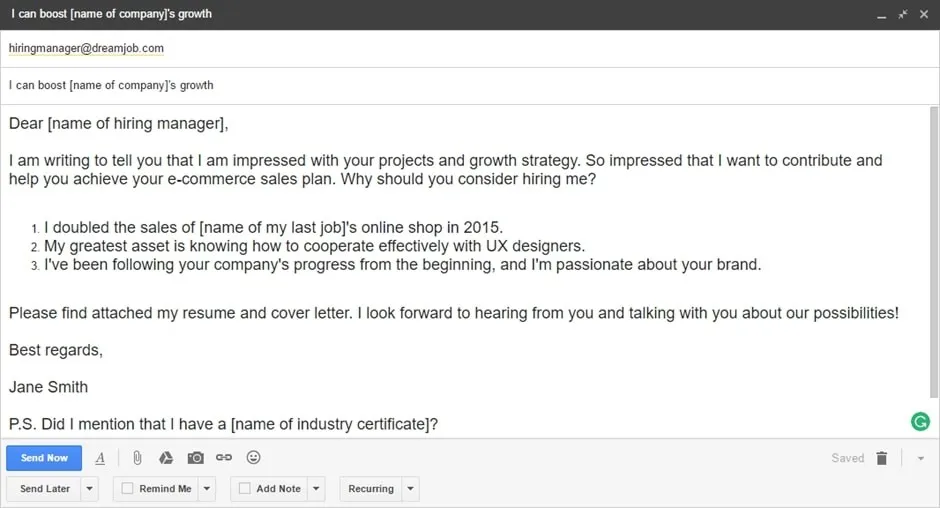
Crafting the Perfect Email Subject Line
The subject line is the first impression you make on a potential employer. It’s crucial to get it right. A well-crafted subject line ensures your email is opened and read. Avoid generic phrases like ‘Resume’ or ‘Job Application’. Instead, be specific and clear, immediately conveying the purpose of your email. The subject line should be concise, ideally under 60 characters, to ensure it displays correctly on all devices. It should also be easy to understand and immediately recognizable as an application for a specific position. A compelling subject line can significantly increase your chances of getting noticed and landing an interview.
Highlighting Your Name and Job Title
Always include your name and the job title you’re applying for in the subject line. This helps the hiring manager quickly identify the email’s purpose and associate it with the correct position. For example, a subject line like ‘Jane Doe - Software Engineer Application’ is much more effective than a generic one. Including these details enables the hiring manager to sort and prioritize applications easily. It also demonstrates your attention to detail and professionalism. By specifying the role, you show that you’ve researched the company and are tailoring your application to their specific needs. This approach increases your chances of getting your application read and considered.
Keywords and Brevity

Incorporate relevant keywords from the job description into your subject line. This can help your email stand out when the hiring manager is searching their inbox. Keep the subject line brief and to the point. It should provide enough information to understand the email’s purpose without being overly verbose. Focus on the most important details, such as your name, the job title, and possibly the reference number (if provided in the job posting). Avoid using unnecessary words. The goal is to be informative and efficient, allowing the hiring manager to understand the context of your email immediately. A clear and concise subject line increases the likelihood of your email being opened.
Formatting the Email Body
The email body is where you introduce yourself, express your interest, and briefly summarize your qualifications. Keep it professional and easy to read. Use a clear and concise writing style. Avoid lengthy paragraphs and complicated sentence structures. The tone should be polite and enthusiastic, reflecting your interest in the position and the company. Treat the email body as a brief cover letter. Highlight your key skills and experiences that align with the job requirements. Proofread your email carefully for any grammatical errors or typos. The email body should complement your attached resume and cover letter, providing a snapshot of your suitability for the role.
Professional Salutation
Start your email with a professional salutation. Use ‘Dear Mr./Ms./Mx. [Last Name]’ if you know the hiring manager’s name. If you’re unsure of the name, use ‘Dear Hiring Manager’ or ‘Dear [Company Name] Hiring Team’. Avoid informal greetings like ‘Hi’ or ‘Hello’. The salutation sets the tone for the rest of the email. It demonstrates your respect and professionalism. Researching the hiring manager’s name shows that you’ve taken the time to personalize your application. If you can’t find a specific name, using a generic but professional greeting is still better than an informal one.
Concise Introduction

In the introduction, state the position you are applying for and where you found the job posting. Briefly express your enthusiasm and why you are interested in the role and the company. Mentioning how your skills and experience align with the job requirements immediately grabs the reader’s attention. Keep this section brief, aiming for no more than two to three sentences. This section sets the stage for the rest of your email. It should clearly and concisely state your intent and capture the reader’s interest from the start, highlighting your suitability for the position.
Mentioning Attached Documents
Clearly state that you have attached your resume and cover letter. This ensures the recipient knows what to expect and can easily find the documents. Provide a brief overview of the attached documents, emphasizing key skills or experiences relevant to the job. For example, you might say, ‘Please find attached my resume and cover letter, which highlight my experience in project management and my passion for [industry]’. This helps the hiring manager quickly understand the context of your application and encourages them to open the attachments. Always make it clear where they can find the crucial documents.
Call to Action
End your email with a call to action. Express your interest in an interview and your availability. Make it easy for the hiring manager to take the next step. For instance, you could write, ‘I am available for an interview at your earliest convenience and can be reached at [phone number] or [email address]’. Make sure you provide your contact information, including your phone number and email address. This makes it easy for the hiring manager to contact you. A clear call to action increases your chances of getting a response. This demonstrates your enthusiasm and initiative, making a positive impression.
Proper Email Closing

Conclude your email with a professional closing. Use ‘Sincerely’, ‘Best regards’, or a similar closing. Avoid overly casual closings. Follow your closing with your full name. Including your full name provides a formal conclusion to your email. Ensure your name matches the one on your resume and cover letter. This consistency helps maintain a professional image throughout your application. Proper email closing will leave a positive impression. This shows you’ve paid attention to detail and respect the reader.
Attaching Your Resume and Cover Letter
Attaching your resume and cover letter correctly is crucial for a successful job application. Ensure that both documents are included as separate attachments. Attachments must be easy to open and view. Proper attachment is one of the main component on how to send cover letter and resume in email, make sure you follow the instructions carefully. Make sure your attachments are in a professional format, such as PDF. Do not include your documents in the email body itself. Make sure that your resume and cover letter align and are consistent with your email content.
File Format Best Practices
Save your documents in PDF format whenever possible. PDF files preserve the formatting of your documents. They are accessible on any device. Avoid using other formats, such as .doc or .docx, unless specifically requested by the employer. PDFs also prevent any potential formatting issues that might arise when the hiring manager opens the document on a different platform. PDF format is universally compatible, making your documents easy to view for anyone. Choose PDF format unless instructed otherwise by the employer. The proper file format ensures that your application materials look professional and are easy to review.
Naming Your Files

Use clear and descriptive file names for your resume and cover letter. Include your name and the document type in the file name. For example, ‘Jane Doe_Resume.pdf’ and ‘Jane Doe_CoverLetter.pdf’. The filenames help the hiring manager easily identify and organize your documents. Avoid generic names. Make sure you use a consistent naming convention for all your application materials. This helps maintain professionalism and makes it easy for the recruiter to keep track of your application. Using a descriptive file name makes it clear what the document is and who it belongs to.
Proofreading Before Sending
Proofreading your email and attachments is essential to ensure a professional application. Always review your email body, subject line, resume, and cover letter for any typos, grammatical errors, or inconsistencies. A single mistake can undermine your application. Proofread multiple times, and consider using spell-check and grammar-check tools. Take the time to thoroughly check your work before sending it. Correcting errors demonstrates your attention to detail and commitment to quality. It also helps you make a positive impression and improves your chances of landing an interview.
Checking for Errors
Carefully check for any spelling errors, grammatical mistakes, and punctuation errors. These small errors can create a negative impression and suggest a lack of attention to detail. Review the email body for clarity, making sure that the content is well-organized and easy to understand. Ensure that the tone is professional and appropriate for the job. Correct any inconsistencies in formatting or information. Proofreading for errors demonstrates your professionalism. Double-check all details to make sure everything is correct. Thorough proofreading can make a big difference to improve the quality of your application.
Sending a Test Email

Send a test email to yourself before sending your application to the hiring manager. This allows you to see how your email looks when received. Check the formatting, subject line, and attachments. Ensure everything appears as intended. Look for any display issues or broken links. Verify that the attachments open correctly. This is your last chance to catch any errors. Sending a test email helps ensure a polished final product. Make sure that everything is correct before submitting your job application.
Following Up After Sending
After sending your email, it’s important to follow up to show your continued interest in the position. Following up is a delicate balance. It demonstrates your enthusiasm without being overly persistent. Know the right time to follow up and the right way to do so. Following up can increase your chances of getting a response. Follow-up is a crucial step that you should not miss. A timely and well-crafted follow-up can make a positive impression and may encourage the hiring manager to consider your application more closely.
When and How to Follow Up
Wait approximately one to two weeks before following up. This gives the hiring manager enough time to review applications. Send a brief and polite follow-up email. Reiterate your interest in the position, and mention the date you sent your application. Reference the job title. Keep the email concise and professional. Ask if they have any questions about your application. Show your eagerness and professionalism. Express your continued enthusiasm for the role. Maintain a positive and professional tone in your follow-up communication. This shows your commitment to the application process and enhances your chances of getting a response.