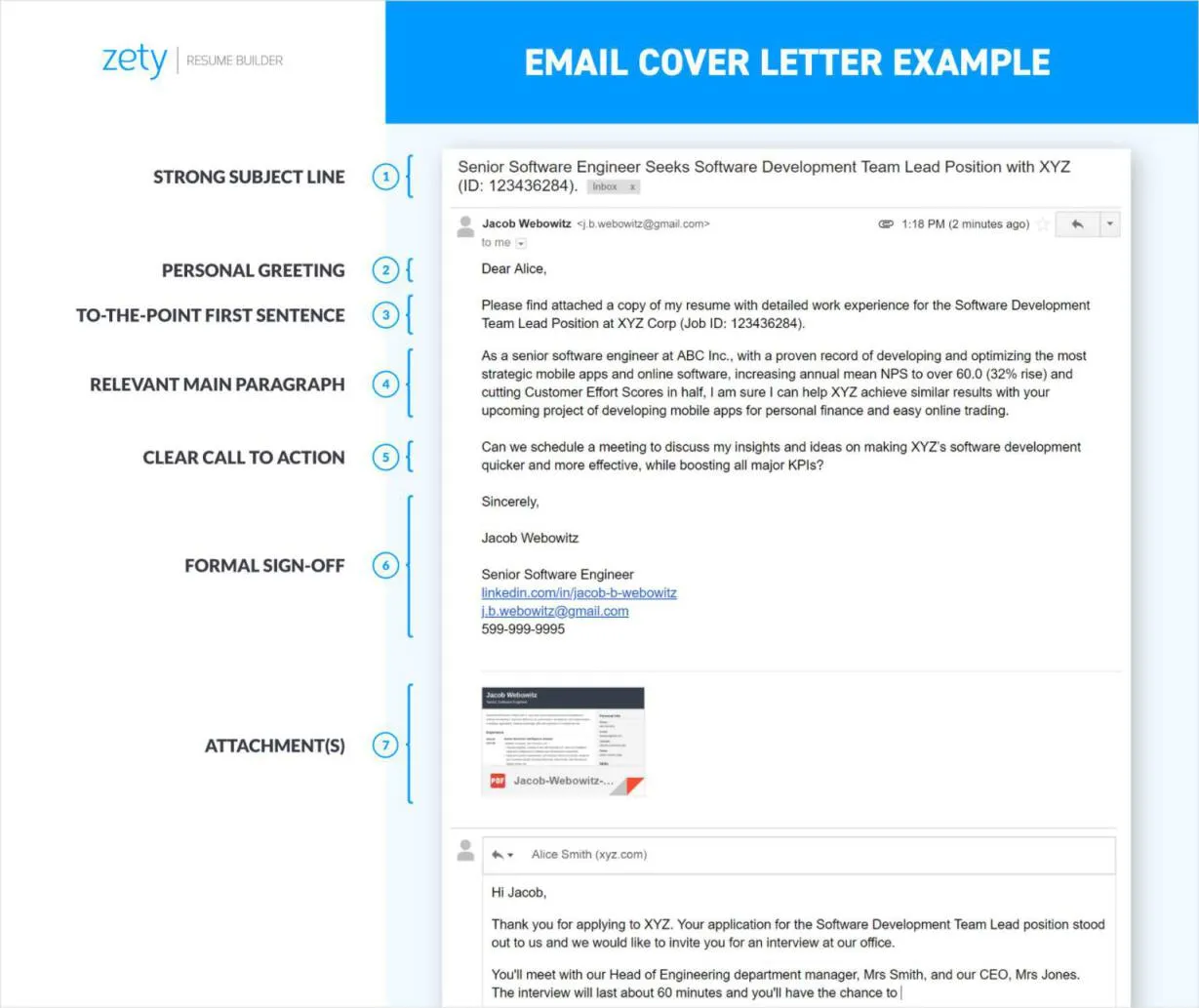
Crafting the Perfect Subject Line
The subject line is your first impression in the digital world, so it must be perfect. It should be clear, concise, and directly state the purpose of the email. Avoid generic phrases like “Resume” or “Job Application.” Instead, use the job title followed by your name. For example, “Software Engineer Application - John Doe” immediately tells the recipient what the email is about and who it’s from. This clarity helps recruiters quickly identify and prioritize your email amidst a crowded inbox. Using a professional and relevant subject line increases the likelihood that your email will be opened and read, ensuring your application gets the attention it deserves. Consider including a reference number if the job posting provides one, as this helps the recruiter quickly match your application to the specific position.
What to Include in the Email Body
The email body should act as a brief introduction, supplementing your resume and cover letter. Start by addressing the hiring manager or recruiter by name if possible. If the name isn’t provided, a generic greeting like “Dear Hiring Manager” is acceptable. Briefly express your interest in the position and mention where you saw the job posting. Highlight one or two key skills or experiences that directly align with the job requirements, encouraging the reader to review your attached documents. Keep it concise, aiming for a few short paragraphs. End with a professional closing such as “Sincerely” or “Best regards,” followed by your full name. This shows professionalism and respect for the recipient’s time, making a positive impact.
Formatting Your Resume & Cover Letter

Formatting is critical for readability. Use a clean, professional font like Arial, Calibri, or Times New Roman, with a font size between 10 and 12 points. Ensure consistent formatting throughout your resume and cover letter. Use clear headings, bullet points, and ample white space to break up text and make it easy to scan. Avoid overly complex designs or excessive use of colors, as these can be distracting and may not render correctly across different devices. Save your documents in a professional format, such as PDF, to preserve formatting and ensure that they appear the same on any computer or device. This ensures your application looks polished and professional, reflecting attention to detail.
Attaching Your Documents Correctly
Proper attachment is essential. Always attach your resume and cover letter as separate files, unless explicitly instructed otherwise. Name the files clearly and professionally, using your name and the document type, such as “JohnDoe_Resume.pdf” and “JohnDoe_CoverLetter.pdf.” This makes it easy for the recipient to identify each document. Double-check that you have attached the correct versions of your documents before sending the email. A common mistake is sending an outdated resume or cover letter. Ensure all files are accessible and open correctly. This prevents any frustration for the recipient, and assures your application is taken seriously.
Choosing the Right File Format
Use the PDF format for your resume and cover letter. PDFs preserve the formatting of your documents, ensuring that they appear the same on any computer or device, regardless of the software used to open them. This is crucial, as it prevents formatting issues that can arise when using other formats like DOC or DOCX. While DOC and DOCX are editable, they are prone to formatting inconsistencies, particularly if the recipient uses a different version of Microsoft Word or a different operating system. PDFs are also more secure, as they are less likely to be altered unintentionally. Always choose PDF unless the job posting specifically requests a different format.
Proofreading for Errors

Before sending your email, meticulously proofread everything. Check your subject line, email body, resume, and cover letter for any spelling, grammar, or punctuation errors. Errors can create a negative impression and undermine your professionalism. Read your documents aloud to catch any awkward phrasing or mistakes that you might miss when reading silently. Have a friend or family member review your documents as a second pair of eyes. They may catch errors that you have overlooked. Pay close attention to details like dates, contact information, and the company name. Proofreading ensures that your application is polished and shows attention to detail, boosting your chances of success.
Sending a Follow-Up Email
After submitting your application, send a follow-up email within one to two weeks if you haven’t heard back. This demonstrates your continued interest in the position. Keep the follow-up email brief, referencing the original email. Reiterate your interest and enthusiasm for the opportunity, and politely inquire about the status of your application. Avoid being overly persistent or demanding. A simple, professional email is sufficient. If the job posting provides a specific contact person, address your follow-up to them. Otherwise, you can use the same contact information you used in your initial email. A follow-up can make you stand out and show you’re proactive. However, respect the company’s timeline and avoid constant follow-ups, which can be counterproductive.